
Download Bartender APK – bartending app, home bar manager, drink recipe finder, cocktail maker, ingredient tracker, cocktail recipe app, cocktail app, drink maker, bar inventory, mixology tool
Overview
Bartender is a dedicated Android application designed to simplify home bartending by turning your mobile device into a personal mixology assistant. The app serves as a comprehensive tool for managing your home bar inventory and discovering new cocktail recipes based on the ingredients you already own. It addresses the common challenge of wasted ingredients and recipe frustration by offering a smart, intuitive system that matches available components to drink possibilities.
Ideal for casual enthusiasts and home mixologists alike, Bartender enables users to explore nearly 500 hand-verified recipes with confidence. Its core functionality revolves around creating a personalized bar profile through the “My Bar” feature, which tracks your current inventory and dynamically generates a list of drinks you can make. This helps reduce decision fatigue and encourages experimentation.
The app also supports planning future purchases via the “Bar Cart” feature, allowing users to identify missing ingredients efficiently. Real-world usage scenarios include hosting gatherings, preparing drinks for personal enjoyment, or simply expanding one’s cocktail knowledge. The developer did not provide additional details about the company or background, but the app’s focus on usability and content accuracy suggests a user-centric design philosophy.
Key Features & Capabilities
- My Bar Inventory Tracker: Users can input and manage all ingredients currently available in their home bar. The system automatically categorizes items and updates drink availability in real time.
- Drink Recipe Finder: Access to nearly 500 hand-verified cocktail recipes, each with clear, step-by-step preparation instructions.
- My Drinks Section: A personalized list of cocktails that can be made using only the ingredients in your current bar inventory.
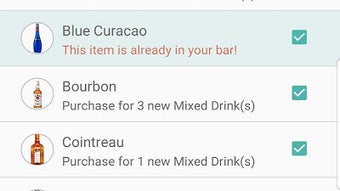
- Bar Cart for Purchases: A smart shopping list feature that identifies ingredients needed to make specific drinks, helping users plan purchases efficiently.
- Favourite Drinks: Save and organize preferred cocktails for quick access and repeated use.
- Make Drinks Feature: Search for all cocktails that include a specific ingredient, useful when you want to use up a particular bottle or explore new drinks.
- All Drinks Browser: A comprehensive library of drink recipes organized for easy navigation and discovery.
These features work together to streamline the bartending process. For example, a user with rum, lime, and soda can instantly see which drinks they can prepare, while another with a new bottle of triple sec can search for cocktails that use it. The app’s structured approach reduces trial-and-error, enhances creativity, and ensures that ingredients are used effectively. The developer did not specify technical limitations or data sources, but the inclusion of verified recipes suggests a curated content strategy.
User Interface, Workflow & Performance
Bartender features a clean, intuitive interface optimized for mobile use. Navigation is straightforward, with a bottom tab bar providing quick access to core sections: My Bar, My Drinks, All Drinks, Favourite Drinks, and Make Drinks. The layout emphasizes readability and visual clarity, using icons and concise text to guide users through each step.
The workflow is designed to minimize friction—adding ingredients, browsing recipes, and saving favorites can be done in just a few taps. The app’s performance is consistent with standard Android applications, though exact resource usage details were not specified. Users can expect smooth transitions between screens and responsive interactions.
Stability appears to be well-maintained, as the app is available on the Google Play Store without reported critical issues. The developer did not provide information on background processes, battery impact, or CPU/RAM behavior. However, the 22.8 MB file size suggests a lightweight footprint, which typically correlates with efficient performance on mid-range devices.
Compatibility & System Requirements
Bartender is designed for Android devices and is compatible with a range of versions, though the specific minimum OS version was not listed. The app is available in version 3.1.2 and has a file size of 22.8 MB, indicating a compact installation footprint. This size suggests minimal storage requirements, making it suitable for devices with limited space.
The developer did not specify exact hardware requirements such as RAM or processor type. Compatibility information was partially provided, and users are advised to ensure their device supports the latest Android updates for optimal functionality. The app is distributed through the Google Play Store, which ensures standard installation procedures and security checks.
No additional dependencies or external services were mentioned.
Pros and Cons
Pros
- Free to download and use with no ads or in-app purchases
- Over 500 hand-verified cocktail recipes with clear instructions
- Smart ingredient tracking and real-time drink availability
- Intuitive navigation and user-friendly interface
- Features like Bar Cart and Make Drinks enhance planning and creativity
- Lightweight installation at just 22.8 MB
Cons
- Compatibility details beyond Android OS were not provided
- Exact system requirements such as RAM or processor specifications are unavailable
- Performance behavior under heavy use or on older devices is not documented
- No cloud sync or backup functionality was mentioned
- Limited information on content update frequency or recipe additions
FAQ Section
Is Bartender available for iOS devices?
As of the latest release, Bartender is only available for Android. The developer did not indicate plans for iOS support.
Is the app safe to download and use?
Bartender is available on the Google Play Store, which provides built-in security checks and regular updates. No malicious behavior has been reported. The app is free and does not require sensitive permissions.
How often are new recipes added?
The developer did not specify the frequency of recipe updates. However, the app includes nearly 500 hand-verified recipes, suggesting a curated and stable content base.
Can I use Bartender offline?
Yes, the app functions without an internet connection after initial setup. All recipes and saved data are stored locally on the device.
Is there a license or subscription required?
No, Bartender is completely free to download and use. There are no in-app purchases, subscriptions, or ads.
Final Thoughts
Bartender stands out as a thoughtful, practical tool for anyone passionate about home mixology. Its core strength lies in transforming a simple collection of ingredients into a dynamic cocktail-making experience. By combining inventory management with a rich library of verified recipes, the app removes the guesswork from bartending and empowers users to create drinks confidently.
The clean interface, logical workflow, and lack of ads enhance the overall experience. While detailed system requirements and performance metrics are not available, the app’s lightweight design and stable presence on the Google Play Store suggest reliability. It is particularly well-suited for casual users, home entertainers, and those looking to explore new cocktail recipes without complexity.
For anyone seeking a secure, free, and efficient way to manage their home bar, Bartender delivers a compelling solution. Download Bartender now.







